This is part of Google Pack. Years back, when I first downloaded Google Pack, there was a option to choose products from the pack which one wants to download. But today when I revisit, astonishingly there is no way one can choose which to download and which ones not.
Google Photos Screensaver is one such service which I wanted to download standalone. Here is the link to do so without downloading Google Pack :)
Google Reader Update:
There are few things that are hidden in Google Reader. There is, currently, no interface to view them. Below the links to reveal the insights. Picked up from here.
* All the posts you've emailed to your contacts:
http://www.google.com/reader/view/user/-/state/com.google/tracking-emailed
* All the posts you have marked as unread at some point (to keep a post unread, you need to uncheck "Mark as read" from the options bar; note that "Mark all as unread" will not maintain this state):
http://www.google.com/reader/view/user/-/state/com.google/tracking-kept-unread
* All the posts you have marked as unread and are still unread (Google Reader calls them "saved items"):
http://www.google.com/reader/view/user/-/state/com.google/kept-unread
* Did you click on a post's main link to go to the original location? You'll find it here:
http://www.google.com/reader/view/user/-/state/com.google/tracking-item-link-used
* Did you click on a link from a post's content? The post should be included in this list:
http://www.google.com/reader/view/user/-/state/com.google/tracking-body-link-used
* If you use the list view, you can find the list of posts you've actually read (or at least you have clicked on the title):
http://www.google.com/reader/view/user/-/state/com.google/read
* Are Google's recommended feeds interesting? Check the list of recommended feeds you've subscribed to:
http://www.google.com/reader/view/user/-/state/com.google/recommendations-subscribed
* Did you accidentally dismiss a recommended feed? You'll find it here:
http://www.google.com/reader/view/user/-/state/com.google/recommendations-dismissed
Monday, November 3, 2008
Google Photos Screensaver


Saturday, November 1, 2008
GAndroid & 3d Desktop
Google Android
A detailed review on Google Android is given here, by an avid iPhone user. His comments sound very honest and unpartial. A very informative read.
3D Desktop
Now this is something which will get one on toes - 3D Desktop, with features to literally stick, hang the sticky notes on walls!!! Bump-top is the name. Its currently only on invitation basis, worth listing our name for a copy. An article here.
Friday, October 31, 2008
MP3 and legality of its distribution
All of us have heard of MP3 and are its daily users. But when it comes to legally using MP3 format, there is a slight hitch, because of the ignorance on legality of the MP3 format. I know few of my friends, in whose companies, having .mp3 files is a crime! So, they are deleted as soon as they are found. Such being the scenario, it was important to know what exactly it is. Below are few sites that give some information regarding this aspect.
- Is MP3 Legal? ( Digital Millennium Copyright Act )
- MP3 Licensing and Patent issues
- Legal MP3 Downloading - illegal MP3 File sharing
- MP3 FAQs
In conclusion, they all aim at saying that MP3 is a format like any other audio format - legal but bound by copyrights. Its distribution is a question mark which is different depending on each country's policies.
Anyone to throw better light into it, always welcome...
SMSing through GChat
Now one can SMS from GChat!!! The window is the same Chat window, making it very very convenient to send multiple smses in one shot, how much ever long, no restriction on characters!
Currently, it is available only for USians. Hope soon it starts for Asians.
The only shortcoming is, the person who is receiving the sms might get charged by the mobile carrier. That is one thing that needs to be seen. Even in Orkut, one can get alert for every new scrap, or new notifications. But, we might get charged by our mobile carriers. If they can make these too free with some short adds for short messages, it would be worth it.
How to enable this feature? Its part of GLabs, last tab under Settings.
One of the last added Lab feature is Adding any gadget by URL. I wonder, what Google, Gmail Team to be precise, has in mind. Are they planning to make this another iGoogle with a difference of emails taking priority over other stuff?
Thursday, October 30, 2008
Mail timings in Gmail
I was having continuous trouble with different timings appearing against my mails in Gmail. Could not just bear this fault from Google. How could Google not take care of this?
But today, searched and I am back with appreciation for Google. There is a entry in Gmail help. Link is here.
What I am not able to understand is why it does not stick to the Time Zone entered against the Google Account. They have considered two things here: Timezone entered and System date and time. This makes the timings against mails dynamic, calculated every time a mail is open on different systems. I was always under the impression that it considers only the Time Zone entered.
In the Account settings, there is an option to associate another mail id against a gmail id. This helps in integrated services of Google. Like Google Calendar invitations sent to any of the primary or associated mail ids will show in gmail id.
Mail id from Orkut profile
How to find mail id of a person just by knowing his/her orkut profile? (Of course of the profile who is not a friend in orkut!)
Here are the steps:
By adding as friend :)
1.Add him/her as your friend.
2.Select friends list and seach for him/her,the email address will be listed along with their name
Without adding as friend:
1.Go to the profile of the user.
2.Click on Ignore user tab given on left side
3.Open your GTalk and click on settings link given on the top
4.Click on blocked users
Now you can see the Email ID which was previously invisible to you. i.e. in short
Orkut profile>Ignore user>GTalk settings>Blocked users>Email ID
Why I went for this? I needed it ;)
Monday, October 27, 2008
Storage used & free status for your Google Account
Following is the link to know the Basic Storage usage by your Google account
https://www.google.com/
I got my storage value using the above link, if you did not get do comment below...
Tuesday, October 7, 2008
Google Moderator
Google has come out with a new service - Google Moderator
It is a place where there will be a regulated discussion, talks and responses to queries by Google Users. There are multiple topics (called series here) listed under which one can raise a question. If one feels that this series is not catering to their needs, one can create a new series and post questions under that topic.
After questions are raised, there is simultaneous voting grading which questions one would like to be answered. Depending on the popularity demands, that question will be answered. Interesting? You too can go and add to the adventure.
Project 10 to the 100th
As part of 10th birthday celebration, Google has launched a Project 10100 (that's "ten to the hundredth"), a call for ideas that could help as many people as possible, and a program to bring the best of those ideas to life. Google is committing $10 million to implement these projects, and while money may offer a jump-start, it will really come down to the great ideas that might be out there. They will be accepting submissions until October 20, 2008, and then they will open up voting in January.
Google's 10th Birthday - musings
As part of their 10th birthday celebrations, a list of Blog posts are made from Google about what their journey was like. A laid-back relaxed read...
Source for this info is Google Friends (Monthly) Newsletter.
Subscribe
Google Friends archive
Google Friends archive prior to May 2005
Monday, October 6, 2008
SMS vs EMS vs MMS
All of us know about SMS - Short Messaging Services & MMS - Multimedia Messaging Services. But then there is one more less-known terminology EMS - Enhanced Messaging Services
EMS stands between SMS and MMS. With EMS one can send picture of a cake, birthday song melody and a text greeting from a EMS capable mobile to another EMS capable phone. With MMS, one can send not only picture of cake, but from a large sized image to a small movie.
More on this:
Messaging Services Fundamentals
About EMS
Google Search on EMS vs MMS
Mobile News:
Sony Ericsson comes out with R-series, T-series phones. Reviews here
Also releases very stylish W980 walkman phone, an edge over W960. A complete look at here.
Reverse Phone Engineering
Ever wondered, if you could find details like name and address of mobile phone owners by just knowing their mobile number? This is called Reverse Phone number and there are sites which provide these details. This is prevalent and currently present only in the west. Though it is not specified anywhere, it is surely not available for Indian mobile phone users.
Sites:
White Pages
Reverse Phone Detective
Home Detective
Saturday, October 4, 2008
Talk about Google Chrome
Here is an interview with Google group product manager Brian Rakowski in regards to Google's web browser. An informative read. Do not miss the uncommented questions in the end...that shows, what world of possibilities lie in the wake of this browser by Google.
Google copying Zoho?
One look at Zoho and you would know its mind-blowing. Incredible is the awareness that, Google has been, kind-off, copying Zoho in many aspects!!! From its online office venture to favicons! Agree, I remember saying 'Google is repeating things that have been existing for long time in this world of internet, but in a refined way and re-defined improvized web experience'. But, when one has a look at Zoho, it would not be difficult to know, it was making Zoho available to us under its name.
Many features are, as it is, picked up from Zoho. Infact, the UIs are a lot similar. Zohos have got a lot more applications, not denying Google will not build it. Favicon of Google Chat/Talk is same as Zoho Chats. Zoho, too has got online Collaboration, Sharing, Publishing on blog...all in all. Whatever Google has got in its Google Docs is by default present in Zoho, in some cases, with a better UI, a lot of extra features (equivalent to Microsoft's Office features)...its huge...leaving it to individuals to explore them.
Another way of looking at Zoho would be, what one can expect from Google in future. One can look at Zoho as Google's road-map. Ofcourse, Google has got few things done like integration of all its apps and plethora of Gadgets, which can be added to its applications...here we cannot deny Google's originality.
List of Blogs for Zoho Products:
Tuesday, September 30, 2008
Hyperlinks in Comments
How does one add hyperlink to the comment on a Blog?
I saw an hyperlinked comment first on this blog for this post. Thats it, I wanted to know how that is done. It hardly took few minutes to know that its the regular html code inserted into comment form. Once done, automatically blogger renders it in html. Never knew this, great to know it! :)
Ex. adding a hyperlink:
< a href =" url">text to display < / a> (without spaces)
replace url with:
http://powerandcontrol.blogspot.com/2007/06/introduction-to-blogging.html
leave the quote marks
replace text to display
with:
An Introduction To Blogging
An Introduction To Blogging
----------------------------------------------------------------
Here is an useful post on
Keeping comment spam off your site and away from users
Complete list of Google Blogs by Categories...
Many a times, we had seen a long list of Blogs of Google displayed to the right side on Gmail Blog or official Google Blog. Now they have removed the long list from all these blogs and produced a link to its complete directory, well categorized. Here is the link. They are divided into five categories
Hyperlinks in composed (g)mail
Long back, when I had just started using Internet, i.e. 4yrs back, I did not know its A-B-C-D. Was worse than a six grader who knew how to e-mail & chat. In these initial stages, for the access provided we could not create any mail id. Thanks to my friends, they gave me one from their many existing ids, Yahoo! being my first. Thats how my journey into this world of internet began.
I got the usual stuff of forwards. I used to get excited and also shocked at the kind of stuff that was coming in e-mails, high quality yet so easily. There it began the stream of forwarding mails to all my friends. One thing I never liked was the history of the mail sent across while forwarding, clearly tracing to its remotest possible source, which was never deleted by the one who was forwarding. It adds to nuisance and takes time to reach the actual content and purpose of the mail. I never wanted that feeling to appear among people whom I was sending these mails. Thus Ctrl+H was deleted. At the same time, I never wanted any of my friends to know from where these mails were coming to me. If they come to know of it, then I become redundant, right? :) So, deleting history added an extra share towards this cause.
Yet there was one more thing that could let others know about the root of a mail, hyperlinks on the images. But, there was nothing one could do to get rid of it. We could not see the html* part of a mail to remove href on a image. We lived through it. Then came the upgradation of gmail to newer version from the older version. In that version, when we clicked on an image or text having an hyperlink, one could
- Go to that link
- Change that link
- Remove that link
But from last few days, this feature is not working. Clicking on hyperlink image, is bringing up a box to add a link, even to an already hyperlinked image. Disappointment. In last few days, this is the second bug in Gmail [FIRST POSTED HERE]. Gmail, what has happened to you!!!
* Show Original option in gmail gives us the html part of the mail. GMail does not show the client-ip, though in some mails I did find there existed a client-ip from where a particular mail was sent but those ips could not be linked to any location. Yahoo! and Rediff give this information, in their headers which when entered into some sites like this, searches for a client-ip mentioned in its header and traces it to the possible location .
Monday, September 29, 2008
FM Radio
I was never clear about these 90 something point something else (93.5, 92.7, etc.) odd sounding numbers on radio. Though I never made a serious effort to know more about them, honestly did not know if anyone would know about them. But today, as a continuation to my impressed impression of Mumbai FM, I hit the search button again with the key words Mumbai FM, this time in Yahoo! (imagine my days...!)
No. Not that I felt Yahoo! would give me better search, but I know of one person who hosts Mumbai FM (later learnt that it is given at a price). That person's directions (years ago) were to go to Yahoo! homepage and give a search with 'FM' and 'his name' as the key words. I did the same today, learnt about the cost, and its existence years ago. Thus ends the pursuit.
These 90 something point something else are radio stations. Great, this much I knew even before. But what I understood is these are radio stations similar to companies like McDonalds. How McDonalds has its outlets in many parts of the country, radio stations like 93.5 FM (with same frequency) captures different cities. Thus, Mumbai as well as Bangalore have 93.5 FM.
There are very attractive websites for each of these radio stations. These frequencies have got their own names:
91.1 FM - Radio City
93.5 FM - Red FM: Bhajate Raho
98.3 FM - Radio Mirchi: Its hot!
104.8 FM - Meow: Thodi Meethi, Thodi Catty (I was wrong in thinking of this as a show on 104.8 FM in my earlier post)
Finally there is one webpage, currently not rendering at all. So, no idea how good it is: Mumbai FM
Friday, September 26, 2008
Airtel - loads of offers...
Today browsed a bit of Airtel site; wanted to know if there was a possibility of online recharge or topups payment, now that I had my fully funtional SBI account. Found that one could recharge or top-up or pay any of its bills online. For that one has to register. But currently, registration form is not getting populated in my browser. Will try it out later sometime, on some other system.
Accidentally found that Airtel is providing some features which are good, two of them being
- LMTS - Lost Mobile Tracking System
- Phone Backup
Mumbai FM
This time when I was in Mumbai, on a regular day, I did not as well as could not remember of listening to FM - Radio Mirchi. But on the final return journey from Mumbai, my bro reminded me of it as a good TP (time-pass) and I switched it on. I could not but stop enjoying it to the fullest, all the way appreciating the life in it.
Many a times, on journey to Bangalore, I got disappointed with its FM...I had expected something like Mumbai's but it was completely out of shape with multiple Kanada interruptions or rather it sounded like Hindi interrupting the Kannada transmission.
Whereas in Mumbai FM, I was so flattered by the innovativeness and creativity that was going on in the conversational part of FM that I was confused to the extent of not knowing which channel to listen to. All were equally enthralling. Some shows names were like KBC - Kachraye Bollywood Contest, Meow - Thodi Meethi, Thodi Catty. Listening to them in the glistening lights of the night traffic of Mumbai, on a 6-laner with bright malls passing by...was a sight to feel and enjoy.
I got this link to listen to Mumbai FM
http://radiotime.com/region/c_100849/Mumbai.aspx
All the channels are not operational, only few.
If anyone can let know of any other website(s) with multiple operational streams, do let us know...
LCD monitor - how to select?
This web-page gives a good overview and detailed understanding that goes into a LCD monitor. Hopefully, it would be helpful not only as knowledge, but also a handy reference while a buy
http://www.ruggedpcreview.com/3_technology_lcd_selection.html
Saturday, September 20, 2008
Blog Feeds inside Gmail ... No you don't have to click on Reader
At one time I'd asked about seeing Google reader feeds from within Gmail? This might be useful:
http://gmailblog.blogspot.com/
Thanks to Hari.
Tried it for a start with Ramnath's blog.
Sits cutely above your Inbox, where you usually find feeds from news sites etc. There should be a way to color them, no ?
Thursday, September 18, 2008
Doubt Gmail dots
All of us know of Gmail dots as a feature which helps us creating multiple pseudo gmail ids for fun, for security, for avoidance of Spam. But for last few days (to be precise, 5 days), my gmail id is giving trouble.
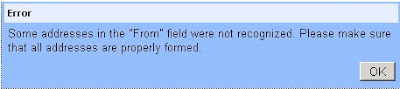 |
Plus, while loading one particular gmail id (not all gmail ids, only this ONE), it is getting stuck at the Loading Page with Done status. After changing http:// to https://, it is going through. For other mail ids, it is automatically adding the S-part of the secure SSL, but not for this mail id. I thought may be because of the option under Settings 'Always Use https' or 'Dont always use https'. But not finding any difference with change in these options...any views?
Update 1: Observed that in Google Chrome, even with http:// Gmail is loading completely, whereas it was not in Firefox. Still it does solve the mystery why it was happening for one gmail and not for any other gmail id. Though today, it has loaded properly, completely, do not know when again it might crop up unless the bug is fixed.
Friday, September 12, 2008
Google Chrome features
Here are few more Google Chrome features - some known, some unknown
1. Show the list of recently visited pages from the current tab: right-click on the "Back" button. This also works for the "Forward" button.

2. Undo closing a tab: press Ctrl+Shift+T or open a new tab and check the "Recently closed tabs" section.
3. Focus on the default search option in the address bar: type ? before entering your query.
4. Perform simple calculations and unit conversions using Google Calculator by simply typing the expression in Google Chrome's address bar (or "omnibox"). To copy the answer, select the suggestion.

5. If you need more space in a textarea, resize it by dragging the lower right corner.

6. Monitor the resources used by a web page - right click inside the page, select "Inspect element", switch to the "Resources" tab and reload the web page. You'll see a list of images, scripts and objects loaded from the web page and you can sort them by size or by loading time.

7. Detach a tab and open it in a new window - just drag the tab outside the active window. You can also add it back to the original window using drag and drop.

8. After downloading a file, you can copy it to the desktop or to any other folder by using drag and drop directly from Google Chrome.

9. If the search engine of a site supports OpenSearch, you can add it to Google Chrome's search box by simply visiting the site and performing a search. The domain name automatically becomes a keyword and you should only type the first letters from the URL until you see "press Tab to search example.com". Then press Tab and type your query.

You can also manually add search engines, by right-clicking on the address bar and selecting "Edit search engines". Here's one example, where you can see that you need to find the URL for the search results page and replace the query with %s:
Name - Wikipedia
Keyword - wiki (that's what you need to type in the address bar)
URL - http://en.wikipedia.org/wiki/Special:Search?search=%s
You can also use the keywords for other kinds of services: for translating web pages, for bookmarking pages online or simply as aliases for web pages (omit "%s" from the URL).
Name - Google Translate (English)
Keyword - trans
URL - http://translate.google.com/translate?u=%s
10. Do you want Google Chrome without Google's branding and with an open source license (BSD license)? Check Chromium, the open source project created for Google Chrome. You can install the latest snapshots for Windows or download the code and build it in Windows, Mac, Linux.
To install Chromium in Windows, go to the most recent directory from this page (it should be at the top) and download mini_installer.exe. Note that these snapshots could be less stable than the version available at google.com/chrome and you may need to manually update Chromium.

Source: http://googlesystem.blogspot.com/2008/09/google-chrome-tips.html
Downloading Google Help files
Google has got a superb Help which caters to almost all the needs of a user. But what if we want to download them and make them available offline? Append ?fulldump=1 to the address of a Google help center. This doesn't work for all Google services, but here's a list of addresses that dump all the information from a help center (note that the pages are very large and are frequently updated):
Gmail Help: http://mail.google.com/support/?fulldump=1
Google Calendar Help: http://www.google.com/support/calendar/?fulldump=1
Google Docs Help: http://docs.google.com/support/?fulldump=1
Google Spreadsheets: http://docs.google.com/support/spreadsheets/?fulldump=1
Google Presentations: http://docs.google.com/support/presentations/?fulldump=1
Google Reader Help: http://www.google.com/support/reader/?fulldump=1
Google Video Help: http://video.google.com/support/?fulldump=1
YouTube Help: http://help.youtube.com/support/youtube/?fulldump=1
AdSense Help: https://www.google.com/adsense/support/?fulldump=1
Analytics Help: http://www.google.com/support/googleanalytics?fulldump=1
Google Desktop Help: http://desktop.google.com/support/?fulldump=1
Picasa Help: http://picasa.google.com/support/?fulldump=1
Google Toolbar for IE: http://www.google.com/support/toolbar/?fulldump=1
Google Toolbar for Firefox: http://www.google.com/support/firefox/?fulldump=1
Google Earth (PDF): http://earth.google.com/userguide/v4/google_earth_user_guide.pdf
To convert the HTML pages to PDF, try doPDF for Windows or any other free PDF printer. This Wikipedia article also has a list of PDF converters.
Passwords or Passfaces?
Instead of entering Passwords (characters), one enters password through faces ('characters' ;-) )
Details here...
Wednesday, September 10, 2008
Increased security on mail ids in Google Groups
Today I happened to go to Google Groups to see if there was a possibility of uploading videos or photos. It does give an option on uploading files, but need to find out if explicitly there is a way to upload photos and/or videos.
What in the process was observed is that Google Groups has added increased security in not letting anyone see mail id of any member. In Yahoo Groups, one can see the mail id of a member directly. Whereas in Google Groups, it shows first few characters, then replaces the rest with elipsis '...' appended with @domain name.com. If one has to see the mail id completely, a screen to enter CAPTCHA appears [WHAT IS A CAPTCHA] [HOW STRONG IS GOOGLE'S CAPTCHA]. After the verification here, complete mail id is shown.
Impressed with added security implying extra work for spammers...
Tuesday, September 9, 2008
Myth, Mystery & Truth
There is a website hosted by Barbara and David Mikkelson, a married couple from California called Snopes.com.
It's a website you can visit to find out if something is true or not. It's 100 percent dedicated to finding out the truths and falsities of urban legends, modern day myths and any other stories that travel around the Internet and the realistic world. They provide references wherever possible.
This read should be educative as is many other stuff found other. Have fun going through it.....
Blogs I'm Following...Face Recognition on PicWeb
Blogger:
Sure, its been missing our eye for quite sometime. Unsure when it was introduced, but today discovered it.
Its like, if I am fan of the contents of a blog, and I want everyone in the world (or only myself) to know that I am following all the proceedings, new posts at that blog, then I have to just click on the link 'Follow this Blog', and I will be added to the display-list of all the bloggers who follow that blog.
This feature has to be enabled at an individual blog level so that 'Fans' show to the world (or themselves) that they are fans of the particular blog. When one becomes fan of a blog, it is at the Blogger Profile level...quite obvious though :)
What exactly have they done? They have integrated RSS feeds....If I am subscribed to RSS feeds of a particular site (either through Google Reader or any other FeedReaders), I am becoming 'fan' of the content of that site. By adding this feature, they are just making the identity of all those people who have subscribed to their blog (willing the subscriber wants to reveal his/her identity) known to the world. FeedBurner just displays number of subscribers, where this one shows the profile pic with link to their profile on that site. This is a step towards integration of Blog and Google Reader. I can easily mark myself as a fan of a feed in Google Reader. Vice-versa, a particular site gets subscribed automatically to Google Reader when I mark myself as its fan.
What is Following?
How do I add Following gadget to my Blog?
You can see me following Google Student Blog :)
And I need to see, how many follow my blog! :o)
Update 1:
In Google Reader, it gives option to "hide blogs you follow" under Settings -> Preferences -> Misc -> Show followed blogs from Blogger (check or uncheck it)
Picassa Web:
Addition of Face Recognition into PicWeb has taken globe by a storm (officially called 'Name Tags'). There are multiple forums, blogs, sites talking about it, reviewing its credibility, durability, and usefulness. Let me give my own comments on it.
I have tagged about 340 photos (agree, the count does have some duplication). Stunning thing is, it groups similar faces and tags them in one go. It has kind of solved one of the biggest research problem on generic face recognition and their grouping (Raghu sir to confirm and authorise). This grouping is irrespective of a person wearing a cap or not! :)
Okay, so one part is it is: groups images together (ofcourse, not 100% of pics are grouped in one go. Might be due to difference in the angles of face, complexion, light balance, etc.). After we tag few pictures, it provides suggestions for tagging a new pic(face) / group of pics(faces). If I have tagged name 'Raghu sir' (this name/mail id comes from the contacts list of Gmail) against a pic(face) of his (which was framed by internal process of PicWeb which takes few minutes to finish its processing), then if there comes another pic or group of pics of Raghu sir, then one of the three name suggestions for the pic is invariably Raghu Sir. When I observed this, I had to appreciate the brain behind this working.
It first identifies a face, then continuously it compares with already tagged face and suggests that name which closely fits it. For one of the pics, it gave me only one suggestion and that was 100% correct!!!
Link to read up. Theres a lot to it, no doubt. But these things, were something I could not stop myself from appreciating.
People are welcome to share their experiences...
Saturday, September 6, 2008
Vulnerabilities in Google Chrome
GChrome does have promising features which are not part of any browser till date like Task Manager (which shows each open window as a process, the way it deals with each tab. This helps when a window/website crashes since each Tab/NewWindow is a separate process and crash of one window/website will crash only that process saving all other tabs. It displays the memory taken by each site apart from CPU usage implying 'blame where blame belongs'); drag tab out to a window; defining which all sites to be opened on startup; incognito browsing; creating own Desktop, Menu, Quick Launch icons reserving the whole window page for this application; added heavy Java engine compatible for all heavily loaded Web Applications.
Before its launch, a 38-page online comic book was released discussing Google Chrome
This article talks about Five best features of Google Chrome
A article to not get carried away with GChrome: Dont get hooked on Google Chrome hype
Vulnerabilities GChrome are discussed here. Indeed a good read
DoS vulnerability hits Google's Chrome, crashes with all tabs
Google Chrome vulnerable in carpet-bombing flaw
Google Chrome, the security tid-bits
Microsoft has incidentally released, as expected, buggy next IE, IE8.
Details here: A look at Microsoft's release of IE8 beta 2
.
Friday, September 5, 2008
Office Hair by Chrome Window
GChrome: Sure all have heard already about Google's release of yet another product - Google Chrome, its new browser. Few highlights are there, but it still has quite a long way to go to become best. But we do know it will live upto it.
HairCare: Who does not want to look good with hair on top of our scalp. But its always the lack of info that leads to that situation or maintains us there or worsens as expected. Dr. Reddy's has come out with a site to popularize the facts of this Hair Loss and its treatment. Went through the site. Was impressive. Here is the link (Hair Aware). Worth a go.
Web Windows Office Live: Ah! Microsoft's answer to Google Docs - Web based access to Microsoft office utilities. Folder Explorer UI looks similar to GDocs. Did not work out any documents on it. They claim one can have 1000+ documents online. Arent we happy with unlimited documents online with GDocs! Here is the link. For logging-in, you do not have to have a Windows LiveID, any mail id can be used as a log in.
Thursday, August 14, 2008
Mashups
Very few are people who did not hear about Mashups, another Web 2.0 terminology.
Mashups is a web application which combines data from multiple sources into a single tool [SOURCE]
There are different types of Mashups: Consumer mashups, Data mashups, and Business mashups. [DETAILS HERE]
Ex. Google Maps
Difference between Mashup and Portal: There are quite a few, all listed diligently on Wiki here.
Never knew that individual content on Portal is called Portlets!
Google has got a editor which will help quick creation of web applications and Mashups. It is called Google Mashup Editor. Currently, it is given out only to developers. So all do not have ready signup as yet. One needs to request for a spot, which is given when next available, by signing up here.
Art of Travelling Light
Shockingly there is a site which details the art and science of travelling light with just one bag, no matter where and for how many days. Have a look
Portable Apps
All Portable Apps at this site: http://portableapps.com/
List of Apps: http://portableapps.com/apps
The list goes something like this :)
Applications
 Accessibility
Firefox Accessibility Extension - Make Firefox more accessible
On-Screen Keyboard Portable - Easily access an on-screen keyboard
Virtual Magnifying Glass Portable - A full-featured screen magnifier
 Development
Notepad++ Portable - A full-featured text editor with syntax highlighting
Nvu Portable & KompoZer Portable - The easy-to-use Nvu web editor
XAMPP - Apache, mySQL, PHP, phpMyAdmin, etc in one package
 Education
Stellarium Portable - portable planetarium
 Games
Games
DOSBox Portable - classic DOS games to go
Jooleem Portable - simple and addictive puzzle game with great music and visuals
LBreakout2 Portable - breakout-style arcade game similar to Arkanoid
Mines-Perfect Portable - a classic hunt-for-mines game with advanced features
PokerTH Portable - classic Texas Hold Em style poker at its best
Sudoku Portable - the wildly popular and addictive puzzle game
 Graphics & Pictures
GIMP Portable - Photo and Image Editor
 Internet
FileZilla Portable - the full-featured FTP client
FireFTP Extension (for Firefox) - a lightweight extension
Miranda IM Portable - chat with AOL, MSN and Yahoo users in a customizable interface
Mozilla Firefox, Portable Edition - the award-winning web browser that's safe and secure
Mozilla Thunderbird, Portable Edition - the handy email client
Pidgin Portable - chat with AOL, MSN and Yahoo users in an easy-to-use interface
PuTTY Portable - lightweight telnet and SSH client
Sage Extension (for Firefox) - A full-featured RSS extension
WinSCP Portable - SFTP, FTP and SCP client
 Music & Video
Audacity Portable - A simple audio editor and recorder
BonkEnc Portable - extract, convert, and encode audio
CoolPlayer+ Portable - Lightweight, fast, easy-to-use audio player
MPlayer Portable - Full-featured movie player with support for most video formats
VirtualDub Portable - video processing and capture utility
VLC Media Player Portable - An easy to use media player that plays most audio and video formats
 Office
AbiWord Portable - a lightweight word processor compatible with Microsoft Word files
GnuCash Portable - accounting, expenses and financial management
Mozilla Sunbird, Portable Edition - Calendar and task management with a familiar interface
OpenOffice.org Portable - word processor, spreadsheet, presentations with Microsoft compatibility
PDFTK Builder Portable - split, collate, watermark and password protect PDF documents
PNotes Portable - stick notes to go
Sumatra PDF Portable - a lightweight PDF viewer
Task Coach Portable - to do list and task manager
 Operating Systems
Mac-on-Stick - Run Mac OS Classic 7 portably
 Utilities
7-Zip Portable - File archiver and compressor
ClamWin Portable - Antivirus on the go
Command Prompt Portable - Simple link to a customizable command prompt
Eraser Portable - securely delete files and data
InfraRecorder Portable - full-featured CD and DVD burner
JkDefrag Portable - Disk defragmentation and optimization
KeePass Password Safe Portable - Secure, easy-to-use password manager
PeaZip Portable - Easy to use file archiver and compressor
PortableApps.com Backup - integrated backup utility bundled with the platform
Toucan - backup, sync and encrypt for advanced users
WinDirStat Portable - disk usage analyzer and cleanup tool
winMd5Sum Portable - check md5 sums to verify files on the go
WinMerge Portable - file comparison and merging


